Design Youtube
High-level design walkthrough for a YouTube-like system.

On this page
- 1. Problem Scope
- 2. Back of the Envelope Estimation
- 3. High Level Architecture Overview
- 4. Video Upload Flow
- Step 1: Presigned URL Generation
- Step 2: Triggering the Transcoding Pipeline
- Step 3: Transcoding Pipeline (DAG Model)
- Step 4: Completion and Metadata Update
- 5. Video Streaming Flow
- Streaming Protocol: HLS
- Adaptive Bitrate Streaming
- Streaming Hop by Hop
- Importance of CDN (Content Delivery Network)
- 6. Data Layer
- Metadata Database: DynamoDB
- Caching: Redis with LFU Eviction
- 7. System Architecture Summary
- 8. Key Design Decisions Summary
1. Problem Scope
We focus on two core flows: video uploading and video streaming. Auth and social features like comments, likes, and subscriptions are out of scope. (The LLD version of YouTube covers the class design side of the same product.)
Constraints and assumptions:
- Max video size: 1 GB
- 5 million daily active users
- Each user watches 5 videos per day == 25 million video views per day
- 10% of users upload 1 video per day == 500,000 video uploads per day
- Average raw video size: 300 MB
2. Back of the Envelope Estimation
| Metric | Value |
|---|---|
| Raw upload storage | 500,000 videos/day × 300 MB = 150 TB/day of raw video ingested |
| Storage after transcoding | Each video gets transcoded into multiple resolutions: 360p, 480p, 720p, 1080p, and potentially 4K. Keeping the original plus all the renditions multiplies storage by roughly 3-4x |
| Realistic storage requirement | ~450–600 TB/day |
| Video starts | 25 million views/day ≈ 290 new streams per second on average, several times that at peak |
Each view lasts minutes, not seconds, so the number of streams running at the same time is much larger than the number starting each second:
Concurrent streams ≈ 290 starts/sec × ~300 sec average watch time ≈ 87,000
Bandwidth          ≈ 87,000 × ~5 Mbps (a 1080p stream)          ≈ 435 Gbps
That figure is why the video bytes are served from CDN edge nodes, not origin servers: origin bandwidth requirements are only a fraction of total delivery bandwidth.
3. High Level Architecture Overview
The system has two major pipelines running in parallel:
- Video pipeline: handles upload, transcoding, and delivery
- Metadata pipeline: handles all structured data about videos
These two pipelines are loosely coupled and communicate asynchronously through Kafka.
4. Video Upload Flow
Step 1: Presigned URL Generation
When a user selects a video and hits upload, the client does not send video bytes to the API server. Instead, the client requests a presigned S3 URL from the API server. The API server generates this URL and returns it. The client then uploads the raw video file directly to S3 using that URL.
This is critical. Routing a 1 GB file through your API server fleet is wasteful, introduces unnecessary latency, and creates a bottleneck. Direct-to-S3 upload keeps API servers doing what they are good at, i.e. handling lightweight requests.
For files this large, the upload is usually split into parts (S3 multipart upload, with a presigned URL per part). Parts upload in parallel, and if the connection drops at 80%, only the unfinished parts are retried instead of the whole gigabyte.
Step 2: Triggering the Transcoding Pipeline
Once the raw video lands in S3, S3 fires an object creation event, which is bridged into a Kafka topic. Transcoding workers consume from this topic and begin processing the video. This keeps the pipeline fully asynchronous and decoupled, workers process at their own pace and the system handles traffic spikes gracefully without overwhelming the transcoding fleet.
Step 3: Transcoding Pipeline (DAG Model)
Video processing is modeled as a Directed Acyclic Graph (DAG).
The DAG separates processing into three streams:
- Video tasks: transcoding into multiple resolutions, watermarking, thumbnail generation, inspection
- Audio tasks: extraction and encoding
- Metadata tasks: parsing and storing video metadata
flowchart LR
    RAW[Raw video] --> PRE[Preprocessor:<br/>split into GoPs]
    PRE --> V[Video tasks:<br/>transcode, watermark,<br/>thumbnails, inspect]
    PRE --> A[Audio tasks:<br/>extract, encode]
    PRE --> M[Metadata tasks:<br/>parse, store]
    V --> OUT[Encoded output:<br/>all resolutions]
    A --> OUT
    M --> OUT
The video file is first split into Groups of Pictures (GoPs), short, independently decodable chunks. This enables two things: parallelism across workers and resumability on failure.
The pipeline has six components:
- Preprocessor: It splits the video into GoP chunks, generates the DAG for that video, and stores chunks in temporary fast storage (in-memory or a fast cache layer) for use during processing.
- DAG Scheduler: It takes the generated DAG and breaks it into discrete tasks, scheduling them for execution.
- Resource Manager: It maintains task queues, worker queues, and running queues. Acts as the brain of the processing cluster, allocating tasks to available workers.
- Task Workers: They execute the assigned tasks.
- Temporary Storage: Fast intermediate storage used to pass chunks between pipeline stages. Discarded once processing is complete.
- Encoded Video Output: Final transcoded files in all target resolutions, pushed to origin storage for CDN distribution.
Step 4: Completion and Metadata Update
When transcoding completes, the worker does not write directly to the metadata database. Instead, it publishes a completion event to a Kafka completion topic. A completion handler service consumes this event and updates the metadata database and cache to mark the video as available for streaming.
This decoupling is intentional. Direct DB writes from workers would create tight coupling, make retries harder, and risk a thundering herd on the database during peak upload hours.
5. Video Streaming Flow
Streaming Protocol: HLS
Video platforms use adaptive streaming protocols. HLS (HTTP Live Streaming) and MPEG-DASH are the two main ones, and they work the same way (YouTube itself mostly uses DASH, and HLS on Apple devices). Here is how HLS works:
- The transcoded video is stored as small segments, typically 2–10 seconds each
- A manifest file (M3U8) is generated, acting as an index of all chunks across all available resolutions
- The client downloads the manifest first, then fetches chunks sequentially as playback progresses
- The client never downloads the full file, it stays a few chunks ahead of the playback head
master.m3u8                 ← the top-level manifest
├── 360p/playlist.m3u8      → segment_001.ts, segment_002.ts, ...
├── 720p/playlist.m3u8      → segment_001.ts, segment_002.ts, ...
└── 1080p/playlist.m3u8     → segment_001.ts, segment_002.ts, ...
Adaptive Bitrate Streaming
The video player continuously monitors two signals: available network bandwidth and buffer health (how many seconds of video are pre-loaded). Based on these signals, the player autonomously decides which resolution to request for the next chunk.
The M3U8 manifest supports this by containing multiple playlists, one per resolution. When conditions change, the player simply switches which playlist it pulls chunks from. No server-side event is needed, this is entirely client-side logic. Because every resolution is cut into segments at the same points in the video, the player can switch between them at any segment boundary without a visible jump.
Streaming Hop by Hop
- User hits play -> API server is called
- API server fetches video metadata from cache (Redis) or DB -> returns CDN URL and manifest URL
- Client fetches M3U8 manifest from CDN edge node
- Client begins pulling video chunks from the CDN edge node
- On a CDN cache miss, the edge node fetches the chunk from origin storage and caches it for subsequent requests
- Player continuously adapts resolution based on bandwidth and buffer health
Importance of CDN (Content Delivery Network)
Video files are static content, the same bytes served to every viewer. This makes them perfect CDN candidates. A popular video uploaded once can be cached at hundreds of edge nodes globally and served millions of times without touching origin servers. Without CDN, a trending video would cause a thundering herd on origin servers, a problem no amount of horizontal scaling alone can cheaply solve.
6. Data Layer
Metadata Database: DynamoDB
Video metadata (title, description, uploader ID, CDN URL, processing status, timestamps) is stored in DynamoDB. The primary access pattern is a simple key-value lookup by video ID, which maps cleanly to DynamoDB's model. For more geographically distributed deployments, Cassandra is an alternative worth considering.
Caching: Redis with LFU Eviction
Hot video metadata is cached in Redis. YouTube's access pattern is heavily skewed. A small fraction of videos receive the vast majority of views. Caching the top 20% of videos by popularity yields a very high cache hit rate without needing to cache the entire catalog.
LFU (Least Frequently Used) is the right eviction policy here. A viral video that has been receiving millions of views for three days should stay in cache no matter what else happens. Under LRU (Least Recently Used), a burst of one-off requests, for example a crawler or a user binge-browsing old uploads, pushes each of those videos to the front of the line and can evict genuinely popular ones that just weren't touched in the last few seconds. LFU looks at how often a video is requested, not only how recently, so one-off accesses never outrank a video with millions of views.
In Redis this is the allkeys-lfu policy. Its frequency counters slowly decay over time, so a video that was viral last month and is now rarely watched eventually loses its place too, instead of staying in cache forever on past popularity. (Redis eviction policies covers the options.)
7. System Architecture Summary
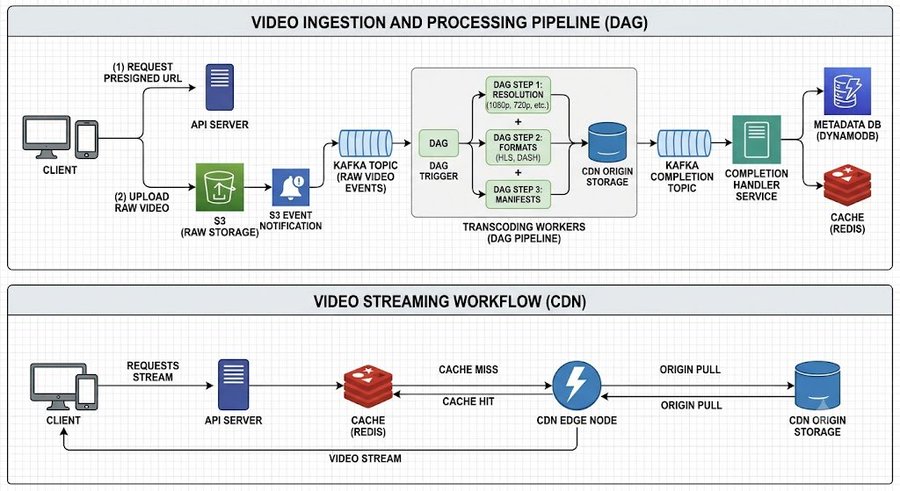
In the streaming half, Redis answers the metadata lookup (where the manifest lives), while the video bytes themselves come from the CDN edge node, which pulls from origin storage on a miss.
8. Key Design Decisions Summary
| Decision | Choice | Why |
|---|---|---|
| Raw file upload | Presigned S3 URL | Avoids routing GBs through API servers |
| Pipeline trigger | S3 event to Kafka | Async, decoupled, scalable |
| Transcoding model | DAG with GoP splitting | Parallelism and fault tolerance |
| Streaming protocol | HLS with adaptive bitrate | Chunked delivery, client-side quality adaptation |
| Content delivery | CDN | Static content, massive cache hit rate |
| Metadata store | DynamoDB | Key-value access pattern by video ID |
| Cache eviction | LFU | Frequency-skewed access pattern |
| Inter-service communication | Kafka | Decoupling, async, replay capability |