GenAI + Agentic AI series #2
Tokens, Tokenization and Context Windows
What tokens are, how tokenizers are built, and how tokens decide your cost, latency and context window
On this page
- The strawberry problem
- So what is a token?
- How a tokenizer is built: Byte Pair Encoding
- Why LLMs can't spell (and other token quirks)
- Not all text costs the same
- Context windows up close
- Two limits, not one
- What happens when it's full?
- Tokens are money and time
- How pricing works
- A worked example
- How latency works
- Prompt caching
- Counting and saving tokens in practice
- How to count
- How to save tokens
- TL;DR
The strawberry problem
For a long time, if you asked an AI model "How many r's are in strawberry?", there was a good chance it would say two. The right answer is three.
This is a model that can write code, explain physics and pass hard exams. So why does it trip over a word a kid can spell?
The answer is tokens. The model never sees the word "strawberry" the way you do. It sees a few chunks of it, turned into numbers. Once you understand that, a lot of strange LLM behavior suddenly makes sense.
Tokens also decide three things you care about as a builder:
- How much you pay. APIs charge per token.
- How fast you get an answer. Models produce one token at a time.
- How much the model can remember. The context window is measured in tokens.
In Article 1 we saw that an LLM predicts the next token, over and over. In this article we zoom in on the token itself: what it is, how it's made, why it causes weird bugs, and how to manage it in real apps.
So what is a token?
A token is a small piece of text that the model treats as one unit. It can be a whole word, part of a word, a space plus a word, a punctuation mark, or even a single byte.
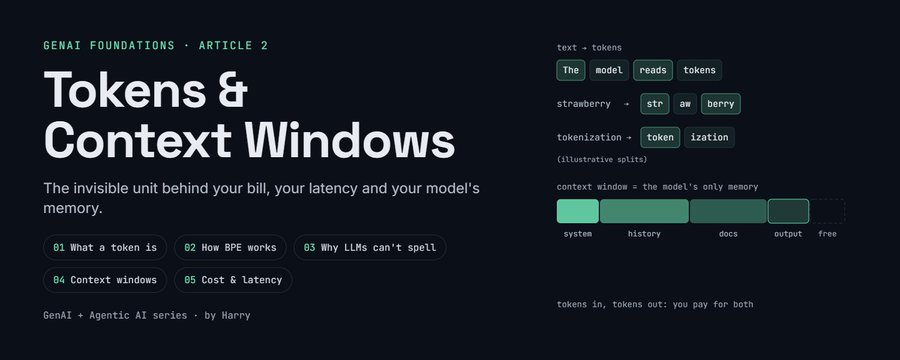
Here's roughly how a sentence might get split (the exact split depends on the model):
"I love tokenization!"

["I"] [" love"] [" token"] ["ization"] ["!"]
A few things to notice:
- Common words are usually one token. "I" and "love" show up so often that they get their own token.
- Spaces are often glued to the front of a word.
" love"(with the space) and"love"(without) can be different tokens. - Longer or rarer words get broken into pieces. "tokenization" becomes "token" + "ization".
- Punctuation is often its own token.
Each token is then swapped for a number, its token ID, from a fixed list called the vocabulary. So the model really sees something like [40, 3021, 4037, 2065, 0]. (These numbers are made up for the example.)
That's it. The model reads numbers, predicts numbers, and a decoder turns the numbers back into text for you.
Handy rule of thumb for English: 1 token is about 4 characters, or about three quarters of a word. So 100 tokens is about 75 words, and a 1,500 word blog post is roughly 2,000 tokens. It's a rough guide, not an exact count.
How a tokenizer is built: Byte Pair Encoding
Why not just use whole words, or single letters?
- Whole words would need a giant vocabulary (every name, typo, URL and new slang word), and any word not in the list would break.
- Single letters would work for everything, but text would become very long. A 500 word answer would be thousands of tokens, which is slow and expensive.
Tokens are the middle ground: common chunks get their own token, rare stuff is built from smaller pieces. The most popular way to find those chunks is Byte Pair Encoding (BPE). (Article 1 introduced it briefly in the tokenizer section.) The idea is simple enough to do by hand.
The recipe:
- Start with a big pile of training text, split into single characters (or bytes).
- Count every pair of neighbors. Find the pair that shows up the most.
- Glue that pair into one new token and add it to the vocabulary.
- Repeat steps 2 and 3 until the vocabulary is the size you want.
A tiny example. Say our whole training text is just these words, with how often each appears:
low    x5
lower  x2
newest x6
widest x3
| Round | Most common pair | Count | New token |
|---|---|---|---|
| 1 | e + s | 9 (6 in "newest", 3 in "widest") | es |
| 2 | es + t | 9 | est |
| 3 | l + o | 7 ("low" and "lower") | lo |
| 4 | lo + w | 7 | low |
(In round 1, s + t is also at 9. Ties like this are broken by a fixed rule, and either choice ends up merging est by round 2.)
After 4 merges:
low     -> [low]
lower   -> [low] [e] [r]
newest  -> [n] [e] [w] [est]
widest  -> [w] [i] [d] [est]
After just four rounds, "low" is a single token and "newest" is down to n + e + w + est. Do this tens of thousands of times on terabytes of text and you get a real vocabulary. Modern models use vocabularies of roughly 50,000 to 250,000 tokens.
Two important points:
- The tokenizer is trained before the model, and then frozen. It's a fixed lookup, not something smart. It doesn't understand meaning at all. It just knows which chunks were common.
- Every model family has its own tokenizer. The same sentence can be 20 tokens on one model and 26 on another. Never assume token counts carry over between providers.
Modern tokenizers usually work on bytes, not letters. Since any text (any language, any emoji) is just bytes underneath, the model can always fall back to byte level pieces. That means there's no such thing as an "unknown word" anymore, only words that cost more tokens.
Why LLMs can't spell (and other token quirks)
Back to strawberry. A tokenizer might split it like this:
"strawberry" -> ["str"] ["aw"] ["berry"]
The model sees three number IDs. It doesn't see ten letters. To count the r's, it would need to remember how each of those chunks is spelled, which it only learned indirectly from training data. That's like asking you how many strokes are in a word written in a script you can read but never wrote by hand. You'd have to guess.
So it's not that the model is dumb. It just can't see the letters. The same root cause shows up in other places:
- Spelling games and letter counts. Reversing a word, counting letters or finding rhymes are hard for the same reason.
- Math with long numbers. A number like 1234567 might be split into chunks like "123" + "456" + "7". The chunks don't line up with place value (ones, tens, hundreds), which makes digit by digit arithmetic harder. Many newer tokenizers split numbers into fixed small groups to help with this.
- Weird spacing and casing. "Hello", " hello" and "HELLO" can be totally different tokens, so the model may treat them a bit differently.
- Glitch tokens. Some old tokenizers had strange tokens (often odd usernames from the training data, the best known being " SolidGoldMagikarp") that the model almost never saw during training. Asking about them could produce garbage output.
Newer models handle a lot of these better, mostly because they've been trained on lots of examples of spelling and counting, or because they reason step by step ("s, t, r, a, w..."). But the underlying limit is still there.
Builder takeaway: if the task needs exact characters (counting, string manipulation, precise math, checksums), don't ask the model to do it in its head. Give it a tool, like a code runner or a calculator, and let it call that.
Not all text costs the same
Because the vocabulary is built from training text, whatever was common in that text gets cheap, efficient tokens. Everything else gets chopped into more pieces.
| Text | Token cost | Why |
|---|---|---|
| English | Cheapest | Most tokenizers were trained mostly on English, so English words are usually one or two tokens |
| Other languages | Often more | The same sentence in Hindi, Tamil, Arabic or Japanese can take noticeably more tokens than in English, sometimes several times more, depending on the tokenizer |
| Code | Depends on style | Common keywords (function, return, import) are cheap. Long variable names, deep indentation and minified code can eat lots of tokens |
| Numbers, IDs and hashes | Expensive | A UUID or an API key is random-looking text, so it breaks into many small tokens |
| Emoji and special symbols | Often several tokens each | Underneath they're multiple bytes |
| JSON | Overhead | All those quotes, braces, colons and repeated key names add up. The same data as compact text or a simple table can be much smaller |
A few notes on that table:
- Languages: newer tokenizers with bigger vocabularies have narrowed the gap, but it's still real. If you build for Indian users, this matters for both cost and how much fits in context.
- Code: some tokenizers have special tokens for runs of spaces just to make code cheaper.
The lesson: don't estimate tokens from word counts alone. For anything that matters (budgets, limits, pricing), count with the real tokenizer. We'll see how in a bit.
Context windows up close
In Article 1 we called the context window the model's only memory. Let's look at what actually goes into it.
The context window is the total number of tokens the model can handle in one request. Everything counts against it:
- System prompt: your instructions, persona, rules.
- Tool definitions: every tool you give an agent is described in text, and that text uses tokens on every single call.
- Conversation history: all previous user and assistant messages.
- Retrieved data: documents, search results, tool outputs.
- The current user message.
- The model's answer: yes, output tokens share the same window.
Think of it as a fixed size whiteboard. Everything has to fit on it at once, including the space the model needs to write its reply.
|<------------------------- context window ------------------------->|
| system prompt | tools | history | retrieved data | user msg | reply |
Two limits, not one
APIs usually have:
- A context limit: input plus output together.
- A max output limit: how many tokens the model may generate in one reply. This is often much smaller than the context limit. If your answer hits it, the response just stops mid-sentence.
What happens when it's full?
The model itself doesn't decide. Your app (or the chat product) has to. The common options:
| Option | What it does | Trade-off |
|---|---|---|
| Reject the request | The API returns an error saying the input is too long | Nothing is lost, but nothing happens either |
| Truncate | Drop the oldest messages | Simple, but the model forgets early details, like the user's name or the original goal |
| Summarize | Compress old parts of the conversation into a short summary and keep going | Keeps the gist, loses some detail |
| Retrieve | Keep the full history or documents in a database and only pull in the relevant pieces each time | Most scalable, more moving parts. This is the idea behind RAG, coming in Part II |
Bigger is not always better. Even when a long input fits, models can pay less attention to things buried in the middle of a huge prompt (often called "lost in the middle"), and every extra token costs time and money. A focused 5,000 token prompt often beats a messy 100,000 token one.
For agents this matters even more. Every tool call adds its result to the context, so a long agent run can fill the window fast. Managing that is a big part of agent design, which we'll cover in Part III.
Tokens are money and time
How pricing works
Almost every LLM API charges per million tokens, with two separate prices:
- Input tokens: everything you send (system prompt, history, documents, tool definitions).
- Output tokens: everything the model writes back. These usually cost several times more than input tokens, because generating is slower work than reading (Article 1 explains why).
A worked example
Let's use made-up prices to keep the math easy: $1 per million input tokens and $5 per million output tokens. Real prices vary a lot by model, so check your provider's pricing page.
Say you run a support bot. One request looks like this:
| Part | Tokens |
|---|---|
| System prompt | 2,000 |
| Tool definitions | 1,500 |
| Conversation history | 3,000 |
| User message | 500 |
| Total input | 7,000 |
| Output (reply) | 500 |
Cost per request:
Input:  7,000 / 1,000,000 x $1 = $0.0070
Output:   500 / 1,000,000 x $5 = $0.0025
Total:                           $0.0095   (less than one cent)
Looks tiny. Now run it 100,000 times a day: that's $950 a day, or roughly $28,500 a month.
Now trim the conversation history from 3,000 to 1,000 tokens by summarizing it. You save 2,000 input tokens per request, which is $0.002 each, or $200 a day. Small token savings become real money at scale.
How latency works
Tokens also decide how long the user waits:
- Time to first token grows with the input size. A huge prompt means a longer pause before anything appears.
- Total time mostly depends on the output size, because the model writes one token at a time. If a model writes 50 tokens per second, a 500 token answer takes about 10 seconds. A 2,000 token answer takes about 40.
That's why streaming matters (users see words appear right away) and why asking for shorter, structured answers is one of the easiest speedups.
Prompt caching
Many providers now offer prompt caching. If the start of your prompt is the same on every call (like a long system prompt and tool list), the provider can reuse its earlier work on that part. Cached input tokens are billed at a big discount and processed faster. So: put the stable stuff first, and the changing stuff (user message, fresh data) at the end.
Call 1: [system prompt][tools][history A][user msg 1]
Call 2: [system prompt][tools][history B][user msg 2]
         └──── same prefix: cached ────┘
The cache only matches an identical prefix. Change one character near the top (a timestamp in the system prompt, say) and everything after it has to be processed again.
Counting and saving tokens in practice
How to count
- Read the usage field. Almost every API response tells you exactly how many input and output tokens that call used. Log it on every request. This is your ground truth for cost.
- Use the tokenizer library. For OpenAI models,
tiktoken(Python) lets you count tokens locally. For open models, the Hugging Facetokenizers/AutoTokenizerlibraries load the exact tokenizer for each model. There are ports for other languages too, liketiktoken-gofor Go. - Use the provider's counting endpoint. Some providers offer an API that counts tokens for a request before you send it. Handy for checking you're under the limit.
Here's a quick way to see tokenization for yourself:
import tiktoken

enc = tiktoken.get_encoding("o200k_base")
tokens = enc.encode("I love tokenization!")

print(len(tokens))                         # how many tokens
print([enc.decode([t]) for t in tokens])   # what each token looks like
Try it with "strawberry", a Hindi sentence, a UUID and some JSON. It's the fastest way to build intuition.
How to save tokens
- Trim the system prompt. Cut repeated rules and long examples that don't change the output. Test before and after with your evals.
- Only send the tools you need. An agent with 40 tools pays for 40 tool descriptions on every call. Load tools based on the task.
- Summarize old history instead of sending the full conversation every time.
- Retrieve, don't dump. Send the 5 most relevant chunks of a document, not the whole PDF.
- Ask for shorter output. "Answer in under 100 words" or a strict JSON schema saves output tokens, which are the expensive ones.
- Keep stable content first so prompt caching can kick in.
- Strip noise from tool results. If an API returns 200 fields and you need 5, filter before passing it to the model.
- Pick the right model. A smaller, cheaper model is often good enough for simple steps like classification or routing.
In the support ticket pipeline I work on, tool results were one of the biggest token sinks. Raw API responses are full of fields the model never needs. Filtering them down before they hit the context made calls cheaper, faster, and honestly more accurate too, because the model had less noise to dig through.
TL;DR
- A token is a chunk of text (a word, part of a word, or a symbol) turned into a number. Models read and write tokens, not letters.
- In English, 1 token is roughly 4 characters or three quarters of a word.
- Tokenizers are built with BPE: start from bytes and keep merging the most common pairs. Each model family has its own.
- LLMs struggle with spelling, letter counting and long-number math because they can't see individual characters. Give them tools for that.
- English is cheap. Other languages, code, IDs, emoji and JSON often cost more tokens.
- The context window holds everything: system prompt, tools, history, data and the reply. When it's full, your app has to truncate, summarize or retrieve.
- You pay per token, and output tokens cost more. Small savings per request turn into big money at scale.
- Count with real tokenizers and usage logs, not word counts.
Tokens are the unit of everything in LLM land: cost, speed and memory. Get comfortable with them and a lot of "weird AI behavior" turns into plain engineering problems you can fix.
Next up, Article 3: Transformers without the math overload. We'll open up the architecture behind every modern LLM and see how attention actually turns tokens into understanding. Follow along so you don't miss it.